

IT Lifecycle Management: A Competitive Advantage for Modern Enterprises
For most enterprises, IT is no longer just “the team that orders laptops.” It shapes employee experience, security posture, and operating margin. Yet the lifecycle of IT assets—how they’re bought, configured, used, and retired—often remains fragmented across spreadsheets, ticket queues, and local offices.
You see the symptoms quickly: devices sitting untouched in storage while new hires wait for hardware, inconsistent configurations that make support a slog, and laptops that disappear from inventory without ever being properly wiped. Costs go up, risk goes up, and no one can say with confidence exactly what’s in the environment.
That’s where IT lifecycle management becomes a strategic advantage. When the full journey of every asset is planned, measured, and repeatable, IT leaders can cut waste, strengthen security, and give employees the right tools at the right time.

What IT Lifecycle Management Really Is (Beyond Asset Tracking)
Many organizations equate lifecycle management with asset tracking: serial numbers, locations, and maybe refresh dates. That’s necessary, but far from sufficient.
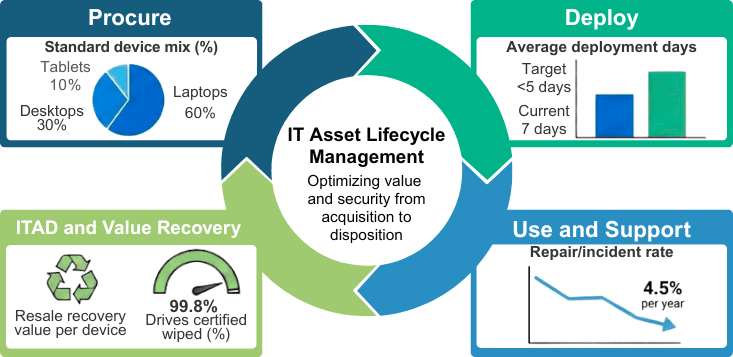
True IT lifecycle management is an end-to-end discipline that connects four stages into one continuous loop:
- Procurement – Selecting the right devices, vendors, and standards.
- Deployment – Imaging, configuration, and getting devices into users’ hands.
- Usage & Maintenance – Monitoring performance, handling repairs, and redeploying where needed.
- Disposition (ITAD) – Secure data destruction, remarketing, and environmentally responsible recycling.
The value comes from treating these stages as a single system rather than four disconnected processes. Procurement decisions affect support complexity. Deployment quality affects security. Disposition practices influence compliance and sustainability reporting.
When the lifecycle is designed as a whole, organizations can move from “Where are our laptops?” to “How do our IT assets support our growth targets, risk appetite, and employee experience?”
IT Asset Lifecycle Management Process & Systems Mapping
The Hidden Cost of Ineffective IT Lifecycle Management
The cost of an unmanaged IT lifecycle rarely shows up as a single big line item. Instead, it leaks out in dozens of small, recurring ways.
Hardware is purchased “just in case” because nobody trusts the inventory data. Offices keep their own side stock to avoid delays, leading to duplicate spending. Devices stay in service long after they should have been refreshed, increasing downtime and support tickets. At the same time, perfectly good hardware sits on shelves because no one has time to test, repair, or redeploy it.
Security and compliance are also at risk. If your inventory isn’t accurate, you can’t be sure every device is patched. If your disposition process isn’t standardized, it’s hard to prove that every drive was wiped or shredded. That makes audits more painful and increases the chance of data exposure.
Individually, each of these problems may seem manageable. Across thousands or tens of thousands of endpoints, they add up to real money, measurable risk, and frustrated teams.
The Business Benefits of Modern IT Lifecycle Management
When enterprises treat lifecycle management as a core capability, the impact is felt far beyond the IT department.
Cost reduction through smarter asset management
Lifecycle visibility allows you to buy less and use more. Standardized device catalogs reduce the total number of models IT must support. Data from your environment, such as actual refresh age, failure rates, and redeployment success, feeds a smarter IT procurement strategy. Instead of defaulting to “new device every time,” you can confidently reuse and redeploy where appropriate.
Over time, this reduces capital spend, storage costs, and emergency purchases. It also enables more predictable budgeting, since refresh plans are driven by data rather than urgent requests.
Stronger security and compliance
Security becomes more reliable when every device follows the same path. New assets arrive with baseline images, mobile device management (MDM), and endpoint security already in place. Devices are patched according to policy because they’re visible in a central system. When equipment reaches end of life, it moves through a documented IT asset disposition (ITAD) process with certified data wiping or shredding.
The result is a cleaner audit trail, fewer blind spots, and better alignment with regulatory requirements.
Better employee experience and operational efficiency
Employees notice lifecycle maturity most at key moments: their first day, role changes, and hardware failures. When devices show up configured and ready, new hires can contribute faster. When a laptop fails, a hot-swap unit can be shipped the same day instead of starting a weeks-long saga with local spare pools and ad hoc approvals.
For IT, this shift frees the team from constant firefighting. Instead of manually tracking down assets or rebuilding machines one at a time, they focus on designing standards, improving automation, and partnering with the business.

Four Practical Steps to Optimize Your IT Lifecycle
You don’t need to overhaul everything overnight. Progress often starts with tightening the weakest stage and then expanding outward.
1. Make procurement lifecycle-aware
Shift procurement away from one-off orders toward standardized, lifecycle-aware planning. This means:
- Selecting IT assets for durability, supportability, and compatibility.
- Aligning device standards to user personas (e.g., power users vs. task workers).
- Coordinating with finance so refresh and reuse plans are baked into budgets.
Sturgeon helps enterprises design procurement programs that anticipate how hardware will be deployed, supported, and retired.
2. Treat deployment as a designed user experience
Deployment is where users first feel the strength (or weakness) of your lifecycle. A well-designed approach includes centralized imaging and configuration, consistent security tooling, and kitting that ensures every box arriving at a desk contains everything the user needs on day one.
Modern deployment often leverages tools like Intune, JAMF, or other MDM platforms for zero-touch or low-touch setups. Combined with reliable logistics, this turns “new laptop day” from a disruption into a non-event.
3. Monitor, maintain, and redeploy with intention
During active use, the focus shifts to visibility and uptime. Health monitoring tools and well-defined support processes help identify failing devices before they cause major downtime. Structured IT asset tracking ensures you know which devices are under warranty, which can be repaired economically, and which should be redeployed instead of replaced.
This is also where sparing programs and hot-swap strategies shine. Rather than users waiting for a single device to be repaired, they receive a temporary or replacement unit while IT deals with the underlying issue.
4. Elevate ITAD from afterthought to strategic function
End-of-life is where risk, sustainability, and financial recovery intersect. A mature ITAD program includes:
- Verified data wiping or physical shredding for all storage media.
- Remarketing options to recover value from retired hardware.
- Environmentally responsible recycling with documented chain of custody.
For many enterprises, ITAD is where they discover unknown pockets of hardware, unmanaged drives, and inconsistent practices. Fixing this stage closes security gaps and supports ESG commitments at the same time.
What Effective IT Lifecycle Management Looks Like in Practice
Consider a global organization with tens of thousands of laptops, desktops, and mobile devices spread across regions. Initially, each location orders its own hardware, keeps private stock, and manages disposition differently. Inventory accuracy is low, refresh projects are painful, and no one is entirely sure where older machines end up.
After centralizing lifecycle management, the story changes. Device standards are defined by role, and all new hardware flows through a central facility for imaging, configuration, and quality checks. Local offices request assets from shared pools rather than running their own mini-warehouses. As devices age, they move through a predictable process: collected, assessed, wiped, remarketed or recycled, and documented.
The business impact is tangible: lower total cost of ownership per device, smoother onboarding and role changes, fewer surprises during audits, and much clearer visibility into where investments are going. IT leadership spends more time on roadmap discussions and less on chasing serial numbers.
How Sturgeon Turns Lifecycle Discipline into Competitive Advantage
Sturgeon is designed to be the operational backbone behind modern IT fleets, the place where your devices are received, prepared, shipped, supported, and ultimately retired in a secure, consistent way.
Our services span the full IT asset lifecycle:
- IT Asset Management & Warehousing
We receive and inventory your hardware, manage pallet and spare storage, and provide serialized tracking so you know exactly what you own and where it lives. - Configuration, Imaging, and Integration
We handle imaging, MDM enrollment, and application configuration for laptops, desktops, tablets, and servers. For infrastructure, our team builds racks, configures servers and networking gear, and performs firmware updates and testing before anything leaves the facility. - Logistics & Fulfillment
Sturgeon manages inbound and outbound labels, coordinates shipping, and supports white-glove services when needed. Hot-swap and sparing programs keep your users working when devices fail. - IT Asset Disposition (ITAD)
At end of life, we provide secure data wiping and shredding with certificates, remarket eligible hardware to recover value, and ensure remaining materials are recycled responsibly.
For IT leaders, this means fewer vendors to manage and a partner that understands how to optimize the IT asset lifecycle to support security, cost control, and user experience.
Getting Started: Build Your Lifecycle Roadmap
If your team is still stitching together spreadsheets, ticket exports, and hallway conversations to understand your device fleet, you’re not alone. Small, well-chosen changes can unlock outsized benefits.
A simple starting roadmap might look like this:
- 0–3 months: Document your current lifecycle stages, identify top pain points, and rationalize device standards where possible.
- 3–6 months: Centralize deployment for key user groups, introduce consistent imaging and MDM enrollment, and start tracking assets through a single source of truth.
- 6–12 months: Expand centralized processes across regions, formalize ITAD with clear data destruction standards, and measure ROI from reduced spend and risk.
Sturgeon works with enterprises at each of these stages, whether you’re just formalizing lifecycle management or scaling a mature program to new regions.
If you’re ready to move beyond ad hoc device management and turn your IT lifecycle into a real competitive advantage, reach out to Sturgeon to design a customized IT lifecycle management program that aligns with your enterprise’s cost, risk, and growth objectives, from procurement and deployment through secure ITAD.